Showing posts with label Games. Show all posts

Sunday, May 19, 2019

ESP8266 GameBoy Emulator, attempt.

I had an idea, to port a GameBoy emulator to an ESP8266 with an LCD screen.
found a good candidate for porting Peanut-GB, it's only a single file (.H) and with
plenty of examples.


Very little setup required and a single lcd_draw_line callback, implement LCD drawing
there and voila, GB emulator on the ESP8266 (node MCU clone), but it seems
the raw power of C is not sufficient for this task, and the LCD library
that I've chosen (TFT_eSPI) and modified was also insufficient to make
the emulator run at adequate speeds.

Games are stored in the flash using bin2hex.

The LCD in use is ST7789 based 240x240 connected to the SPI bus running at 40 Mhz.

Pinout:
NodeMCU - LCD
GND -> GND
3.3V -> VCC
3.3V -> BLK
D3 -> DC
D4 -> RES
D5 -> SCL
D7 -> SDA

So what do we have:
1. The emulator runs, tried with "super mario land", Tetris and a demo.
2. Uhm... Profit ?

What we don't have.
1. Good frame time, each frame takes between 70~200 ms which translates between 14~5 FPS.
2. Audio (There was not enough time for smooth frame rates.. so ...)
3. Key input (Yeah.. no..)


It seems that no matter how hard I tried to optimize the code the drawing part
would always lag, if we remove the LCD part, the core did have enough
time to emulate the game, but I think an emulator without a screen
is not a good emulator :)


What did I try to do:
1. ESP runs at 160 MHz, I can try to use NO_SDK (run at 340 Mhz) by CNLohr but the SPI bus is        affected by it.
2. Optimize the gb_draw_line up the wazoo, replaced all multiplications with right shifts.
3. Added per line hash drawing capabilities, so if the pixels of the line did not change, don;t draw            them, helpful with static games, not so much with scrolling.
4. Moving the game code to DRAM, did not produce significant speed ups. *
5. DynaRec? will probably require a lot of RAM and we have only 32000 bytes left.

* One of the issues that I've encountered is that the game needs to reside on the flash,  but because of alignment issues (the game is a an array of bytes [8-bit] but the memory of the ESP is 32Bit) the reading is slower.


Everything was developed using Sloeber, highly recommended for Android development.
Sources: primary project.
Sources: TFT_eSPI modified library
Hope that helps anybody.

R.

Monday, June 11, 2012

Constellaris - A puzzle Game

Hello All,
I'ts been a while since I've posted last, but I've been busy writing my own game instead of
porting existing ones.

So here it is,
It's called Constellaris and it's for Android platform and now I'm going to shamelessly promote it...

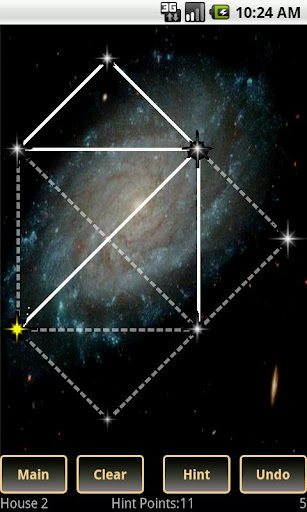
This is a simple puzzle game where you need to draw constellations (basically connect the dots)
You need to bridge two stars on screen without tracing back so that in the end 
you will have the same shape that is traced in the background.
Each level increases the level of difficulty.

You have a hints systems that helps you along the way if you get stuck and some options for convenience (Undo, clear and etc).


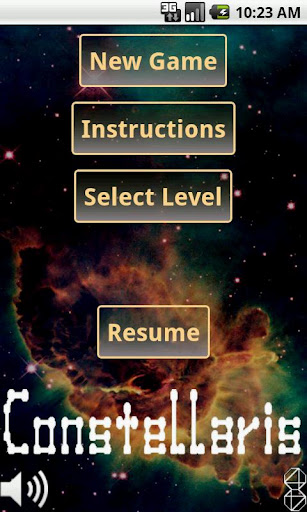
Menu Screen:
Inline image 1

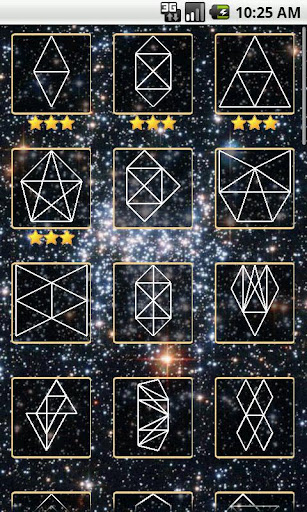
Level Selection:
Inline image 2

In game screen shoot:
Inline image 3

Video of the game play:

There are two versions free and paid, the difference is that the paid version has 27 more levels and no Ads.


Hope you like it.

You can also visit my site: http://www.octa44.com

Thanks!

Sunday, August 28, 2011

REminiscence (Flashback) for N900 (Maemo 5)

Hello,
Port of REminiscence is ready first version.


Download binary here
Download source here

To install type in X Term (While in root):
dpkg -i reminiscence_0.1-1_armel.deb

to uninstall:

dpkg -r reminiscence

This package requires the original Flashback files see readme below.


REminiscence for Maemo 5
-----------------------

You need to have
/home/user/MyDocs/FLASHDATA
and
/home/user/MyDocs/FLASHDATA/SAVES
folders the FLASHDATA folder should have the data files from flashback either
PC or Amiga versions are supported the mod files from the amiga version
can be used with the PC version, but a special naming scheme has to be used

You can use this in a batch file (Windows) to rename the amiga names
to the one supported by reminiscence then copy to FLASHDATA dir.

ren ascenseu.mod mod.flashback-ascenseur
ren ceinture.mod mod.flashback-ceinturea
ren chute.mod mod.flashback-chute
ren desinteg.mod mod.flashback-desintegr
ren donneobj.mod mod.flashback-donneobjt
ren fin.mod mod.flashback-fin
ren fin2.mod mod.flashback-fin2
ren gameover.mod mod.flashback-game_over
ren holocube.mod mod.flashback-holocube
ren introb.mod mod.flashback-introb
ren jungle.mod mod.flashback-jungle
ren logo.mod mod.flashback-logo
ren memoire.mod mod.flashback-memoire
ren missionc.mod mod.flashback-missionca
ren options1.mod mod.flashback-options1
ren options2.mod mod.flashback-options2
ren reunion.mod mod.flashback-reunion
ren taxi.mod mod.flashback-taxi
ren telepor2.mod mod.flashback-teleport2
ren telepora.mod mod.flashback-teleporta
ren voyage.mod mod.flashback-voyage


Keys:

Quit - Q button
Inventory\Skip Movie - Backspace
Operate / run / take - Hold Shift
Gun in/out - Space
Use Object - Enter

Thanks to: Gregory Montoir (http://cyxdown.free.fr/reminiscence)
for creating this great source.


Sunday, June 12, 2011

I'm not dead, But Symbian is...

Hello everybody,

It's been a long time since my last update, there are few reasons for that.

I was working on my port and was almost at the end but encountered a very hard bug with
the sound system which was playing the sounds after a delay which made the game useless
and till this day I had not found a way how to fix this bug there
seems to be some problem with SDL_Mixer.

Nokia also has announced that they will stop supporting Symbian and switch to Windows platform.
There was also another company that did just that to survive but now is almost gone into obscurity, Palm.

These two factors together have demoralized me somewhat so right now porting has been halted.
I still have my n95, but the platform shows it's age which leaves me unwilling to support it for now.

R.K.

Tuesday, February 15, 2011

Abuse Game ported to Symbian s60 v3

Hello all,

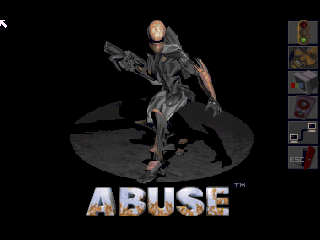
A new port here Abuse :


A phone with an accelerometer is needed.


Hope you enjoy this.

R.K.

Thursday, January 27, 2011

GLTron Fix

Here are some fixes

Release 0.1(14) 
This version has:
 * Problem with the racer model texturing fixed
 * Preferences are now being saves on exit
 * Added several resolution (416x352 and 800x352) others removed
 * Made some speed improvements


Wednesday, January 26, 2011

GLTron minor fix

Here is the fix for you out there that have other then English language set ;)


Release 0.1(13)
This version has:
 * Fixed some regional problems (Thanks Sera from My-Symbian!)


Download Full version

Tuesday, January 25, 2011

GLTron ported to Symbain s60v3

Hello,
Phew, I have been really busy these couple of month, this port took a lot
of time to finish because of the OpenGL part.
Here is the first released version.


This is for the OpenGLES supported phones only
Read the ReadMe file inside the zip carefully!


GLTron for Symbian S60v3 by Ronen K.
--------------------------------
To receive updates please visit: http://mobile4dev.blogspot.com/


GLTron is a game created by Andreas Umbach (http://www.gltron.org)


Release 0.1(11) base on version 0.70 by Andreas Umbach
This version has:
 * First release
 * Game was tested on n95
 * Support for music files of types MOD,XM,IT and etc (all mikmod backed)
 * this game is full port you can try different artpacks
 * You can try changing the scripting files everything should be supported
 * Do NOT turn off the floor texturing (show_floor_texture) it will kill performance


!!! IMPORTANT !!!
-----------------

There are 2 versions of the zip file 

 1. A Full install version GLTronFullS60.zip which contains all the files needed.
    !!!The full version has to be installed on the memory card!!! ie E:
 2. A Minimalistic version GLTronMinS60.zip which contains only the main sis file
    this version requires the directory E:\GLTRON\DATA into which you can copy
    the windows version of the files (see tree.txt for more info)


Credits:
--------
GLTron is the work of Andreas Umbach
SDL_Sound creators
mikmod creators
---------


Required:
---------
 * SDL runtime for S60 http://koti.mbnet.fi/mertama/sdl.html
 * Ability to install Selfsigned apps on the phone
 * OpenGLES compatible phone


If you encounter some errors on the white screen and the game will not load
please let me know.


Download Minimalistic version
Download Full version

Sources

Wednesday, November 10, 2010

Heart of the Alien Redux port for S60

Hello,

Here is a new port for HotA:

download binary
download source


Heart of the Alien Redux for Symbian S60v3 by Ronen K.
--------------------------------
To receive updates please visit: http://mobile4dev.blogspot.com/


Heart of the Alien is the sequel for Another world which was only released for
SegaCD.

To know more about this engine please visit http://hota.sourceforge.net/ (Maintained by Gil Megidish)

Release 0.1(4) base on version 1.2.2 by Gil Megidish (http://hota.sourceforge.net/)
This version has:
 * First release, Redux functionality
 * Quick save/load
 * Game was tested on n95


!!! IMPORTANT !!!
-----------------

There are 2 versions of the sis file (because Sound in this game is awesome)
 1. A version with Music (Heartaline_release_sound_signed.sis)
 2. A version Without Music (but with sound - Heartaline_release_no_sound_signed.sis)

The version with music is very CPU intensive you can try it first
but the music might be choppy (It is very choppy on a N95 8GB)
So choose the correct version.


Credits:
--------
Heart of the Alien Redux is the work of Gil Megidish
AnotherGuest for a great SDL_Mixer port!
Interplay for a great game
---------

To run Heart of the Alien, you'll need a copy of the ISO from the SegaCD.
Ideally it should be a small ISO with many MP3 files for music.
Check Gp32 page if you have the full ISO
http://www.gp32x.com/board/index.php?/topic/24597-heart-of-the-alien-redux-gp32/

I do not know where you can get it.


Required:
---------
 * SDL runtime for S60 http://koti.mbnet.fi/mertama/sdl.html
 * Game data files
 + Game music files MP3 (optional)
 * Ability to install Selfsigned apps on the phone

To install:
-----------
 * Install the SDL on the phone
 * Create HOTADATA folder in the root of the memory Card (Has to be E drive on the phone)
 * copy all the data/music files to HOTADATA
 * install the "sis" file

Controls: (when looking in portrait orientation, the game itself is played
           in landscape orientation)
---------
   D-Pad     - Move left, right, up, or down
   Middle button of D-Pad     - Enter (shoot, keep down in order to run)
   C   - Backspace (Jump)
   App button above             - Same as Enter you can use it as toggle for running
   the green button (answer call) No need to press it to run.
   Pencil or 0 key - Shift (Use your Whip)
   App 2 button above
   the red button (drop call) - Same as Backspace (Jump)

   6 Key - Quick Save
   7 Key - Quick Load
   1 Key - Skip animation / Exit program

Note: !!! Recommended to use MagicKey for key mappings !!!

Known issues:
-------------
* no fast mode
* Not going to work on s60v5 (no keys!) for those who do have keys
  Like the n97 crowd no guaranties that it will install at all.


Leave bugs in the comments.

R.K.

Tuesday, October 26, 2010

REminiscence (Flashback) for Symbian S60v3 Update!

Hello a small BugFix version


Release 0.1(31)
This version has:
 * Small fix for phones that do not have the pencil key
   it is mapped to the 0 key (thanks to sid for finding the bug)


Download

Monday, October 25, 2010

REminiscence (Flashback) for Symbian S60v3

Hello
Here is the port for REminiscence Engine for Symbian phones using s60v3


Details:

REminiscence for Symbian S60v3 by Ronen K.
--------------------------------
To receive updates please visit: http://mobile4dev.blogspot.com/

REminiscence is a re-implementation of the engine used in the game Flashback: The Quest for Identity
made by Delphine Software and released in 1992.  REminicence was first released by Gregory Montoir in 2005.

Release 0.1(30) based on version 0.1.9 by Gregory Montoir http://cyxdown.free.fr/reminiscence
This version Has:
 * First release, basic functionality
 * Save states
 * Hopefully support for QWERTY phones (untested)
 * Some very basic vibration support (currently only when you get hit)
 * Languages support (untested)
 * Game was tested on n95

Credits:
--------
REminiscence is the work of Gregory Montoir (http://cyxdown.free.fr/reminiscence)
Sektor http://gtamp.com/PSP for a great PSP port and the README
Delphine Software for a great game
---------

To run REminiscence, you'll need a copy of the data files from the DOS version
of Flashback.

I do not know where you can get it (google it?!)
Maybe checkout the PSP port...

Required:
---------
 * SDL runtime for S60 http://koti.mbnet.fi/mertama/sdl.html
 * Game data files
 + Game music files from amiga, mods (optional)
   mods have to be in the correct names (check treestructure.txt for them)
   a batch file  (renamemods.bat) is supplied to help rename the files from amiga.

 * Ability to install Selfsigned apps on the phone

To install:
-----------
 * Install the SDL on the phone
 * Create FLASHDATA folder in the root of the memory Card (Has to be E drive on the phone)
 * Inside the FLASHDATA dir create a SAVES dir
 * copy all the data files to FLASHDATA
 + copy the renamed mods to FLASHDATA (optional)
 * install the "sis" file

Controls: (when looking in portrait orientation, the game itself is played
           in landscape orientation)
---------
   D-Pad     - Move left, right, up, or down
   Middle button of D-Pad     - Enter (Use object)
   C   - Backspace (Inventory / exit from a cinematic scene)
   App button above             - Space (Take out / put back gun)
   the green button (answer call)
   Pencil     - Shift (Operate / run / take)
   App 2 button above
   the red button (drop call) - Esc (Game options)

   Long jump - Hold Pencil + left/right, release left/right and then push up
   High jump - Hold Pencil + left/right and then release left/right anytime before you get to an edge
  (he only jumps if ledge is within reach, required on 2nd level)


Note: !!! Recomended to use MagicKey for key mappings !!!

Known issues:
-------------
* No proper Icon
* No Password input (Use save states)
* No compression of saves and replays (as in the original)
* because of no compression the save files from other platforms are
  not compatible
* No mirror mode
* no fast mode
* Not going to work on s60v5 (no keys!) for those who do have keys
  Like the n97 crowd no guaranties that it will install at all.

R.K.
http://mobile4dev.blogspot.com/

For any bugs leave comment here.

Download binary

Download source

Monday, September 20, 2010

TowerStack 1.2

New version of TowerStack
Fixed the battery meter that was completely broken and other minor fixes.

Download

Sunday, September 5, 2010

TowerStack 1.1

Hello,
I've modified TowerStack slightly by adding a battery meter on the main screen.
The meter is calibrated for the WristPDA meaning that if the percentage falls bellow
20% charge I consider it critical, somewhere at 30% the meter will flash with a warning icon.

Also changed the About description somewhat.

Download

Tuesday, August 31, 2010

A new game TowerStack

New blog,New Game.

Time for the first game, it is called TowerStack, you stack blocks one unto the other
and try to make it to the top within the shortest time.
Controls are simple using the PageUp or PageDown (below the rocker switch or above it)
Here is a screenshot


Link for Download (NO more crappy share site!)
Bug reports are welcome as comments.

Welcome to the blog.

Hello and welcome,
I recently acquired a WristPDA (by abacus) and although it is very old (in technological terms)
I like it a lot and that is why I'm developing Applications and Games for it.
In past life I developed software for palm for living, now I do it for fun.

The games should be compatible with most PalmOS devices with version 4.1 and up.
Most of the apps will be adapted to the WristPDA specifically to make them easier to use
on the platform.

So stay tuned here for new apps.
Long live PalmOS!